
When a Mobile Casino Lobby Becomes Hard to Navigate
When a Mobile Casino Lobby Becomes Hard to Navigate
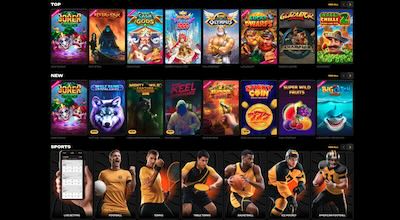
A mobile casino can offer plenty of choice and still feel awkward on a small screen. For Canadian users comparing spinsy online casino access, the practical question is less about the size of the catalogue and more about how quickly the right area can be found. Spinsy’s browser-based layout is designed for phones and tablets, so a few navigation habits can make the lobby, account pages and support tools easier to use.
Start with the browser version, not an assumed app
The mobile experience is described as a responsive website rather than a standard native application. It is intended to work through a mobile browser on iPhone, iPad and Android devices, with the lobby, account area, cashier, promotions and live chat available through the same web platform. This distinction matters because an app-store search may not produce a verified native application.
Using the browser also makes it easier to confirm that you are viewing the current site version. Check the address bar carefully, especially if a search result or advertisement has opened a new page. Avoid downloading files presented as unofficial “mobile apps”, and do not enter account details into a lookalike page. The Canadian Centre for Cyber Security provides official online security guidance that is useful when checking unfamiliar websites and mobile downloads.
For regular access, the website can be saved to the device home screen. On iOS, Safari’s “Add to Home Screen” option creates an app-like shortcut; on Android, Chrome may show “Install app” or “Add to Home screen”. This shortcut does not turn the service into a separate native application. It simply gives the browser platform a more convenient entry point and can reduce the temptation to use an unverified download.

Use filters before scrolling through the full lobby
A large catalogue is convenient only when it can be narrowed quickly. The mobile lobby includes search and provider filtering, along with broad categories such as new releases, popular titles, slots, live casino, table games, jackpots, crash or instant games, and game-show content. Selecting a category before browsing prevents a long stream of unrelated thumbnails from dominating the screen.
Search is most useful when the title or provider is already known. If you remember only part of a game name, try the distinctive word rather than scrolling through every result. Provider filters can also help when a player prefers a familiar studio. Availability may vary by location and site version, so a missing title does not necessarily mean that the search function is malfunctioning.
Category labels can sometimes be broader than they appear. A “table games” area may include digital versions, while “live casino” may contain several formats and hosts. Read the title card and game information before opening a session. Where demo play is offered for a particular slot and permitted in the relevant jurisdiction, it can help with learning the interface, but brief testing does not establish future results, payout performance or suitability.
Keep game discovery separate from account tasks
Small screens make it easy to confuse the game lobby with account functions. Before selecting a title, identify where the menu leads to profile details, transaction history, promotions, loyalty information and support. Keeping these tasks separate reduces accidental taps, particularly when banners or promotional tiles appear between game rows.
The account area is also where practical information may need to be checked. Canadian-facing materials describe CAD as an account currency, but available methods, requirements and other account conditions can vary according to location and the current site version. Do not assume that a method visible in general information will appear in the logged-in cashier. The account-specific page is the more useful reference for current availability.
Verification can affect account navigation as well. Registration details should match identity documents, since a later check may request photo identification, proof of address, a selfie or payment-source confirmation. If an account becomes locked or recovery fails, the described route is the registered email reset option, followed by live chat or email support. Keeping the registered email accessible is therefore part of maintaining smooth mobile access.
Make live casino browsing manageable on a phone

Live casino sections can be more demanding to browse than slot categories because tables may be separated by game type, format or provider. Start with the clearest category, such as roulette, blackjack or baccarat, rather than opening every live tile in sequence. Game-show formats may be listed alongside traditional tables, so check the title and rules screen before committing to a particular interface.
A phone display can hide important information below the visible area. Scroll through the game panel to locate limits, table details, available controls and any information about the format. If the page is slow to respond, avoid repeatedly tapping the same button; mobile browsers can register delayed inputs more than once. A stable connection and an uncluttered browser window generally make navigation easier, but neither guarantees uninterrupted access.
Live chat is described as a primary support channel and is commonly available around the clock, while email can be more appropriate for detailed account or verification questions. Use support for unclear navigation, missing account tools or questions about the current site version. Do not rely on an old screenshot, cached promotion or third-party description when the live page presents different wording.
Build a safer, less distracting mobile routine
Mobile convenience can make gambling feel more immediate, so the device itself should not become the only control. The account area may provide responsible-gambling options such as deposit, loss or wager limits, time-outs, cool-off periods, self-assessment tools and self-exclusion. The exact controls can vary by account or site version, so check which options are currently displayed rather than assuming every tool is available.
Notifications and home-screen shortcuts can also affect how often the site comes to mind. Consider disabling unnecessary browser notifications and removing the shortcut if it encourages unplanned visits. A simple routine—deciding a time limit before opening the site, avoiding play while distracted, and closing the browser afterwards—can make the mobile format less intrusive.
Self-exclusion is a stronger option when a temporary break is not enough. The available information describes support-assisted self-exclusion and periods ranging from several months to multiple years, but the exact process should be confirmed with support. Account closure, access problems and responsible-gambling requests can likewise be raised through the available support channels. Treat these controls as practical boundaries, not as guarantees of financial outcomes.
Mobile navigation questions readers often ask
Is there a native mobile app?
Current material describes a responsive mobile website rather than a standard native app in the Apple App Store or Google Play. The site may be saved to a phone’s home screen for app-like access, but this remains a browser-based shortcut. Verify any download carefully before installing software or entering account information.
Can I find a game without browsing every category?
Yes. The mobile lobby includes search and provider filters, alongside categories such as new, popular, slots, live casino, table games and jackpots. Searching by a distinctive part of the title is usually faster than scrolling. Results and availability can vary by location and the current site version.
Where should I ask about a mobile account problem?
Live chat is described as the main support route, with email available for more detailed issues. These channels can help with login recovery, verification questions, account closure, payment concerns and unclear mobile navigation. Keep registration details accurate and use the registered email when completing recovery steps.